If you sell online, there is a good chance your email list lives in Klaviyo. And if it does, you have probably used Klaviyo popups and signup forms to grow it. They are quick to set up, they sit right next to your flows and they do the basic job well. So when does it make sense to add a gamified popup on top, and how do the two work together without creating a mess in your data?
This guide looks at what each tool is good at, where the limits are and how to connect a game to Klaviyo so that every answer and every prize ends up on the right profile and starts the right flow.
What Klaviyo signup forms do well
Klaviyo's signup forms are built to collect consent and hand new subscribers straight to your flows. As of October 2026, Klaviyo's forms page lists:
- Several form types: pop-ups, fly-outs, embedded forms, full-page forms, banners and teasers.
- Multi-step forms that ask for a little at a time, plus custom questions, dropdowns, checkboxes and countdowns.
- Targeting and triggers by segment, location, cart value, UTM parameters, scroll depth, time on site and exit intent.
- A/B testing of designs, texts and offers, with revenue reporting.
- Consent tools such as consent checkboxes, your own opt-in text and double opt-in.
- Spin-to-win forms for a gamified signup.
Because the forms are native to Klaviyo, there is nothing to connect. A submitted form updates the profile, adds it to a list and can start a welcome flow immediately. For a standard "10% off your first order" offer, that is hard to beat. If a simple discount popup is all you need, you probably do not need anything else.
Klaviyo spin to win: what it covers
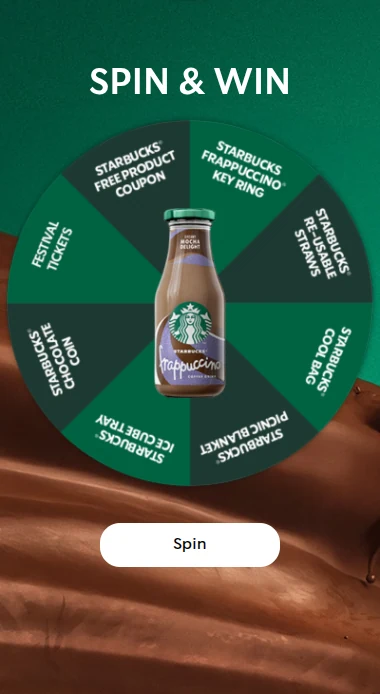
Klaviyo now has its own wheel. According to its help article on creating a spin-to-win signup form (as of October 2026):
- Each form can have one wheel with 2 to 6 slices.
- You set a win chance for every slice, and each slice gets its own success step with a coupon.
- The wheel needs a consent field (email or SMS) before or on the same step.
- You can build segments from the slice a person landed on and use them to trigger flows.
That is a solid option if a wheel with a handful of coupons is exactly what you want. Klaviyo also advises checking local rules before you publish one.
Limits for games, quizzes and data capture
Where Klaviyo forms stop is when the campaign is the game itself rather than a form with a game attached. Some typical cases:
- Other game formats. The forms page does not mention quizzes, and the wheel is the only game listed. If you want a scratch card, a mystery box, a personality test, a product finder, a drop game with a leaderboard or a Christmas calendar, you need a dedicated tool.
- Prize logic. A wheel slice with a win chance works for coupons. It gets harder when you want a fixed number of prizes per day, a daily draw, barcodes for in-store use or a prize that has to last until the last day of the campaign.
- Multi-day campaigns. Calendars, weekly challenges and "play once a day" campaigns need participation limits and a way for people to come back without filling in the form again.
- Answers as data. A quiz or survey creates a lot of useful answers. You want each answer stored and sent on, not just a single coupon result.
- Channels outside your website. A Klaviyo form lives on your site. A game often needs its own landing page for social posts, SMS, QR codes on packaging or a big screen in a store.
This is where a gamified layer such as Scratcher comes in. Scratcher has 40+ formats that all work as a landing page, a pop-up or embedded on your site, with prizes handled for you: instant wins, daily or weekly draws, unique discount codes and barcodes, and limits on how many prizes are given out and when. See how prizes work.
How a gamified layer syncs with Klaviyo
Klaviyo is one of Scratcher's native integrations. The setup is short:
- Create a private API key in Klaviyo. The setup link in Scratcher pre-selects the access it needs (lists, profiles and subscriptions).
- Choose the Klaviyo list each campaign should send people to.
- Pick which fields to send.
From then on, every participant is created or updated as a Klaviyo profile with email, phone number, first name and last name, and subscribed to the list you chose with email marketing consent. You can also choose to send only participants who accepted a specific permission, so people who just played and did not say yes to your newsletter do not end up on your marketing list.
Sign-ups arrive while the campaign runs, not in a CSV you have to remember to upload on Monday. BOBO, for example, sent data from its wheel of fortune straight into its CRM through the Klaviyo integration. Read the BOBO story.
Mapping game answers to profile properties
The real value of the integration is the field mapping. Besides contact details, you can map Scratcher data to custom properties on the Klaviyo profile, for example:
- Your own form fields, such as birthday, postcode or favourite store.
- Quiz and survey answers, one property per question.
- Prize data: the prize name, its value, the unique coupon code and when it was won.
- Campaign data, such as the campaign name, and the channel the person came from.
- Permission data: whether a permission was accepted, the consent text and the date.
- Fixed values you type in yourself, such as
source: black-week-wheel.
A simple example. A beauty webshop runs a three-question quiz before a scratch card: hair type, main concern and how much time people spend on their routine. Each answer becomes a property in Klaviyo. The scratch card result is mapped too, so the coupon code is on the profile. Now you can build a segment of "curly hair, wants less frizz" and send them a product guide that fits, with their own code in the email.
Yuaia Haircare uses this kind of thinking with a personality test that gives each visitor a personal hair routine and tailors its emails to the answers. Read the Yuaia story.
A few tips for clean data:
- Agree on property names before the campaign, and reuse them across campaigns so segments keep working.
- Keep answer options short and fixed (multiple choice rather than free text) if you want to segment on them.
- Map the coupon code if you plan to remind people to use it.
Triggering flows
Klaviyo's help centre lists several flow triggers, including "added to list", "added to segment", metrics and date properties. With a game connected through the integration, two are especially useful:
- Added to list. Give each campaign its own list, or a shared "games" list, and start a welcome flow when someone joins it. This is the simplest set-up and works well for a welcome series with the prize in the first email.
- Added to segment. Build segments from the properties you mapped, for example everyone who won a specific prize or answered a quiz question a certain way, and start a flow when a profile enters the segment.
Some flow ideas:
- Prize reminder: "Your code expires on Sunday" to everyone with an unused coupon property.
- Answer-based welcome: a different first email for each quiz result or survey answer.
- Consolation offer: a small discount for everyone who did not win the main prize.
- Next campaign invitation: when your next game goes live, invite last campaign's players first.
Our Easter guide for Klaviyo and Shopify has more ideas for putting games into your flows, such as a welcome series where new subscribers "unwrap" a gift.
If you also want Scratcher to send the winner emails, the Email module (included on Professional or as an add-on) handles that. Many brands keep all marketing emails in Klaviyo and let Scratcher send only the prize emails.
Klaviyo popups or a gamified popup: when to use which
There is no need to choose one for good. Most brands use both, for different jobs.
Use a Klaviyo form when:
- You want an always-on welcome offer on your site.
- A wheel with a few coupons is all the game you need.
- You want to A/B test simple offers with the least set-up.
Use a gamified popup or landing page when:
- You want a format Klaviyo does not offer, like a scratch card, mystery box, quiz, personality test or calendar.
- The campaign runs across channels: social posts, SMS, QR codes in store, a big screen at an event.
- You need prize control: a fixed number of prizes per day, daily draws, barcodes or prizes that last the whole campaign.
- You want answers you can segment on, not just an email address.
- The campaign is seasonal, like Black Week, Christmas or Easter, and needs to feel like an event rather than a standard form.
A practical split many webshops use: keep a simple Klaviyo form as the default welcome popup, and switch to a game popup for seasonal campaigns. Use the pop-up targeting in Scratcher to show the game on the pages that matter, and set how often it can show, so the two never compete for the same visitor at the same moment. Klaviyo also has its own settings to control which form shows when several could trigger.
Whatever you choose, keep the form short, ask clearly for consent and make sure the data lands in Klaviyo with names you will understand in six months.
Try it with your own Klaviyo account
The easiest way to see how a game fits your Klaviyo set-up is to build one. Start a free 14-day trial, connect Klaviyo, map a couple of fields and test it on your own profile before you go live. Want help planning it? Book a meeting and we will walk you through it.